Check the health of your mentorship in the Overview
In the Overview, you see in one minute whether your students are active, making progress, and finishing. You also find out the time of day they study most.
Step by step
In the menu, open Journey › Overview.
Pick the period: 7 days, 30 days, 90 days, or 1 year.
Read the four cards: Students, Interactions, Average Progress, and Completions.
Under each number, the comparison with the previous period shows whether it got better. What each number means is in the table below.
In the Activity Trend chart, see whether activity is going up or down.
In the Activity by Time map, find the busiest time.
The stronger the color, the more students are studying. Use that time to send your notices.
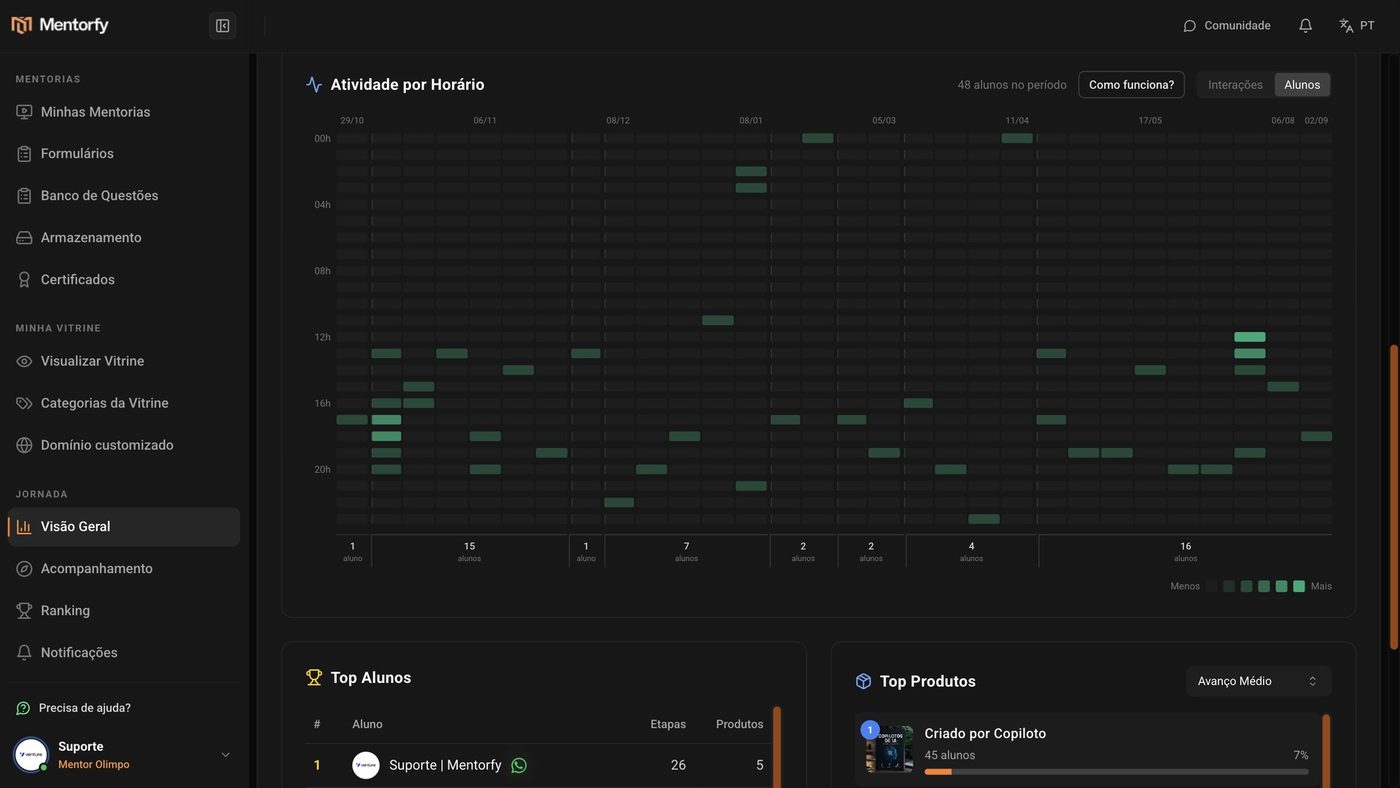
Further down, see Top Students and Top Products.
These are the students and products making the most progress in the period.
Good to know
Found the busy time on the map? Schedule your next notice for it in Schedule a send.
Reference
| Card | What it counts |
|---|---|
| Students | Active: students who interacted at least once in the period. Total: students enrolled in any of your products, all time. |
| Interactions | Answers and submissions in the steps, made in the period. |
| Average Progress | Average progress of those taking part: completed steps divided by the total steps in the product. |
| Completions | Students who completed at least 90% of a product (all-time total). "New" ones are those that passed 90% within the period. |
Common questions
The numbers are low for 7 or 30 days. Is something wrong?
Not necessarily. With few students or little recent activity, pick 90 days or 1 year to see the trend with more data.
How do I see a specific student?
The Overview shows the big picture. To see student by student, use Tracking.